What You Will Learn
How to recognize when Sankey Diagram is the right Mermaid diagram, write the opening declaration, and shape a readable first version.
Best Fit
Conversion funnels, Budget allocation, Energy flow.
Start Here
Copy the starter example, replace labels with your domain language, then simplify anything that does not help the reader.
Syntax Basics
Start with the diagram declaration, then add the smallest set of labels, relationships, and annotations needed to communicate the idea.
- Use sankey-beta as the declaration.
- Write each row as source,target,value.
- Use consistent units across all links.
- Keep node labels stable and readable.
Official Documentation Coverage
The Mermaid documentation for Sankey Diagram covers the following syntax areas. This tutorial condenses those topics into practical guidance for day-to-day documentation.
source,target,value rows
source,target,value rows is part of the official Mermaid Sankey Diagram syntax surface. Add it when the starter example needs more precision for production documentation.
Empty lines
Empty lines is part of the official Mermaid Sankey Diagram syntax surface. Add it when the starter example needs more precision for production documentation.
Commas and quoted labels
Commas and quoted labels is part of the official Mermaid Sankey Diagram syntax surface. Add it when the starter example needs more precision for production documentation.
Configuration
Use Configuration after the diagram communicates the right structure. Styling should improve scanning and emphasis without hiding the underlying Mermaid syntax.
Link coloring
Link coloring controls how elements connect. Treat these connections as the main information layer, and label them when direction, ownership, or meaning is not obvious.
Node alignment
Node alignment defines the named objects in the diagram. Keep names stable, domain-specific, and short enough to remain readable in exported images.
Label style
Use Label style after the diagram communicates the right structure. Styling should improve scanning and emphasis without hiding the underlying Mermaid syntax.
Node width and padding
Node width and padding defines the named objects in the diagram. Keep names stable, domain-specific, and short enough to remain readable in exported images.
How This Tutorial Uses The Official Docs
Mermaid syntax evolves, so the official page remains the primary reference. This tutorial turns that reference material into an authoring workflow, review checklist, and production guidance.
Start with the official grammar
The official Mermaid Sankey Diagram page is the source of truth for syntax changes. Use this tutorial to choose the right authoring pattern, then confirm exact keywords and edge cases in the official reference.
Prioritize the core sections
For the first pass, focus on source,target,value rows, Empty lines, Commas and quoted labels, Configuration. These sections usually explain the minimum structure required for a valid Sankey Diagram.
Add advanced syntax only when it earns its space
Treat Link coloring, Node alignment, Label style, Node width and padding as optional layers. They are valuable when the diagram needs precision, but they should not make the first version harder to read.
Syntax Reference Map
Use this map as a practical reading order for the official syntax page. It separates the first concepts to learn from the advanced details that are better added after the diagram already communicates the right idea.
source,target,value rows is part of the official Mermaid Sankey Diagram syntax surface. Add it when the starter example needs more precision for production documentation.
Does this source,target,value rows detail make the sankey diagram easier to understand or maintain?
Empty lines is part of the official Mermaid Sankey Diagram syntax surface. Add it when the starter example needs more precision for production documentation.
Does this empty lines detail make the sankey diagram easier to understand or maintain?
Commas and quoted labels is part of the official Mermaid Sankey Diagram syntax surface. Add it when the starter example needs more precision for production documentation.
Does this commas and quoted labels detail make the sankey diagram easier to understand or maintain?
Use Configuration after the diagram communicates the right structure. Styling should improve scanning and emphasis without hiding the underlying Mermaid syntax.
Does this configuration detail make the sankey diagram easier to understand or maintain?
Link coloring controls how elements connect. Treat these connections as the main information layer, and label them when direction, ownership, or meaning is not obvious.
Does this link coloring detail make the sankey diagram easier to understand or maintain?
Node alignment defines the named objects in the diagram. Keep names stable, domain-specific, and short enough to remain readable in exported images.
Does this node alignment detail make the sankey diagram easier to understand or maintain?
Use Label style after the diagram communicates the right structure. Styling should improve scanning and emphasis without hiding the underlying Mermaid syntax.
Does this label style detail make the sankey diagram easier to understand or maintain?
Node width and padding defines the named objects in the diagram. Keep names stable, domain-specific, and short enough to remain readable in exported images.
Does this node width and padding detail make the sankey diagram easier to understand or maintain?
How To Study The Official Syntax
The official Mermaid page is broad because it documents the full parser surface. For a working tutorial, read it in passes instead of trying to memorize every option at once.
Skim the official Sankey Diagram documentation once to understand the full syntax surface before copying examples into production docs.
Focus first on source,target,value rows, Empty lines, Commas and quoted labels, Configuration, Link coloring because these topics usually explain the core authoring model.
After the first diagram renders, revisit the official styling, configuration, and advanced sections only when the diagram needs that extra precision.
Authoring Workflow
This workflow turns the official syntax reference into a repeatable writing process for docs, specs, and product pages.
Frame the reader question
Before writing syntax, decide what question the Sankey Diagram should answer. Good diagrams usually answer one question clearly instead of answering several partially.
Draft the smallest valid diagram
Start with the declaration for sankey-beta, add only the required elements, and render it before introducing advanced styling or configuration.
Add semantic labels
Replace placeholder names with business or system language that readers already know. Labels should reduce explanation work.
Review for maintenance
Remove details that are likely to drift quickly. If a value, date, or dependency changes often, explain who owns the update.
Quick Syntax Cheat Sheet
Use this compact reference when you already know the goal and need to write a valid Mermaid Sankey Diagram quickly.
sankey-betaStart the code block with sankey-beta so Mermaid selects the Sankey Diagram renderer.
Use sankey-beta as the declaration.Add the smallest number of statements that express the main idea before adding visual polish.
Use consistent units across all links.Use connections only where they explain ownership, sequence, flow, dependency, or hierarchy.
source,target,value rowsUse official syntax topics as optional layers, not as requirements for every diagram.
Practice Prompts
Use these prompts after reading the official syntax sections. They force the diagram to stay practical instead of becoming a syntax inventory.
Create a Sankey Diagram for conversion funnels using no more than eight visible elements.
Rewrite the starter example with labels from your own product or engineering domain, then remove any line that does not change the reader's understanding.
Add one official syntax feature from source,target,value rows, Empty lines, Commas and quoted labels and explain why that feature makes the diagram clearer.
Compare the result with pie and xy-chart and write one sentence explaining why Sankey Diagram is still the better fit.
Examples
Copy the example into the Mermaid editor, then adjust labels and relationships for your own documentation.
Traffic Sources
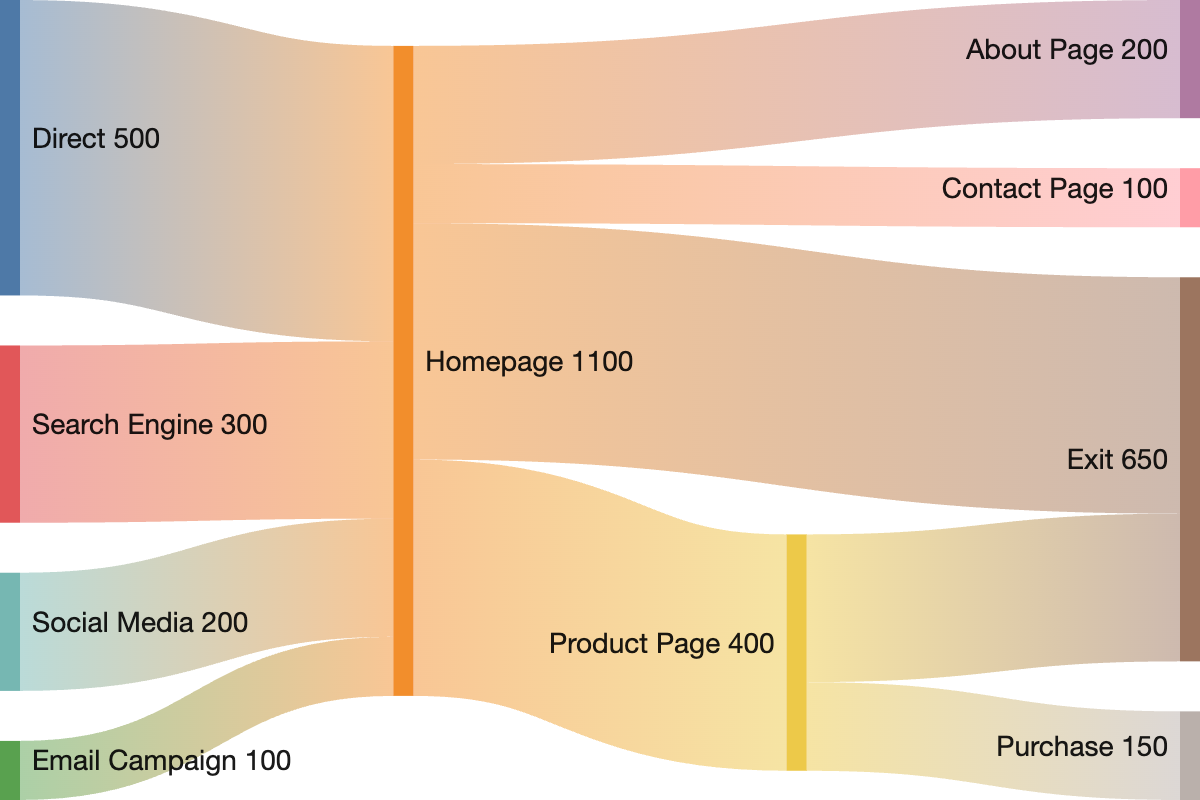
A small weighted flow diagram.
sankey-beta
  Search,Signup,45
  Ads,Signup,25
  Referral,Signup,15
  Signup,Activated,50
  Signup,Dropped,35
Example Walkthrough
Read Mermaid examples from top to bottom. The first meaningful line usually selects the diagram parser; the following lines add labels, relationships, values, states, or layout hints.
sankey-betaThis line declares the Mermaid diagram type, which tells Mermaid which parser and renderer to use.
Search,Signup,45This line contributes a label, item, or nested detail that Mermaid places into the diagram.
Ads,Signup,25This line contributes a label, item, or nested detail that Mermaid places into the diagram.
Referral,Signup,15This line contributes a label, item, or nested detail that Mermaid places into the diagram.
Signup,Activated,50This line contributes a label, item, or nested detail that Mermaid places into the diagram.
Signup,Dropped,35This line contributes a label, item, or nested detail that Mermaid places into the diagram.
When To Use Sankey Diagram
Diagram Choice Guide
A strong Mermaid tutorial should also explain when not to use the diagram type. Use this guide before adding a Sankey Diagram to a public page or technical design document.
Use this diagram when
Sankey Diagram works best for conversion funnels, budget allocation, energy flow. It should make the reader's next decision easier, not merely decorate the page.
Choose a different diagram when
Your main question is better answered by another structure, such as pie, xy-chart, user-journey. For example, use a sequence diagram for message order and a flowchart for branching process logic.
Keep it maintainable by
Keeping the first version small, naming every important element with business language, and linking back to the official Mermaid syntax page when advanced syntax is required.
Production Checklist
Before publishing a Mermaid Sankey Diagram, run through this checklist so the diagram remains useful after the immediate conversation is over.
Production Review Questions
Before shipping the diagram in public docs, compare it against the official syntax page and then ask whether each line helps the reader make a better decision.
Troubleshooting
Most Mermaid issues come from an incorrect declaration, a syntax feature used before the base diagram works, or a diagram that is trying to communicate too many ideas at once.
The diagram does not render
Check that the first line is the correct declaration for Sankey Diagram: sankey-beta. Then remove advanced lines until the smallest version renders.
The diagram renders but is hard to read
Shorten labels, reduce the number of visible items, and split separate ideas into separate diagrams.
The meaning is ambiguous
Add edge labels, relationship names, axis labels, or surrounding explanatory text so readers know what the diagram is proving.
The diagram becomes stale
Prefer stable concepts over volatile implementation details, and add ownership notes when the diagram documents a changing system.
Publishing Notes
For SEO and long-term documentation quality, keep the Mermaid code close to the explanation. Search engines can understand the surrounding text, while engineers can copy the exact syntax into their own editor.
If the diagram is used in a product page, add a short caption that states what decision the diagram supports. If it is used in internal docs, add ownership and update expectations so the diagram does not become stale after the system changes.
Best Practices
- -Use one unit across the whole diagram.
- -Limit categories to the flows that matter.
- -Name nodes consistently.
- -Explain whether values are counts, percentages, or money.
Common Mistakes
- -Mixing units in one diagram.
- -Using Sankey for unweighted relationships.
- -Adding too many tiny links.
Choosing Related Diagram Types
If Sankey Diagram does not quite match your communication goal, compare it with these nearby Mermaid diagram types.
Pie Chart
Pie charts show part-to-whole relationships. Use them when a small number of categories add up to a meaningful total.
XY Chart
XY charts display data across x and y axes. Mermaid supports simple bar and line style charts for documentation-friendly metrics.
User Journey
User journey diagrams describe what a user does, how they feel, and which teams or systems participate. They work well for product and UX documentation.
FAQ
Is Mermaid Sankey Diagram rendered on the server?
This tutorial page is server-rendered for SEO. The Mermaid syntax is shown as plain text so search engines and readers can inspect it without waiting for client-side rendering.
Can I edit this Sankey Diagram example?
Yes. Open the Mermaid editor, paste the example, and modify the labels, relationships, or values for your own use case.